
Table of Contents
- Why UPI Fraud Is Rising
- Common UPI Scam Patterns
- The One Rule That Prevents Most UPI Fraud
- Safe Habits for Everyday UPI Use
- What to Do If You’ve Been Scammed
- Common Mistakes
- Myth vs Fact
- Expert Tips
- Checklist
- FAQs
Introduction
UPI has made digital payments in India remarkably easy — and that same ease is exactly what fraudsters exploit. Most UPI scams don’t involve any technical hacking at all; they rely entirely on tricking the victim into approving a transaction themselves. This guide breaks down how the most common scams actually work and the specific habits that prevent nearly all of them.
Why UPI Fraud Is Rising
UPI’s massive adoption across India, spanning users of every age and digital literacy level, has made it an attractive target precisely because of its scale and speed — transactions settle instantly and are difficult to reverse once approved. The National Payments Corporation of India (NPCI), which operates UPI, and the RBI have both issued repeated public advisories on fraud patterns, reflecting how consistently these scams continue to evolve and target users.
A pattern worth noting: fraud attempts often cluster around specific moments — festival seasons when people expect refunds and cashback, salary days when account balances are freshest, and periods immediately following widely-publicized data breaches at unrelated companies, when scammers use leaked contact details to run more convincing, personalized attempts. Being aware of these higher-risk windows doesn’t mean being paranoid every day, but it does mean treating unexpected payment requests with a bit more scrutiny during these specific periods.
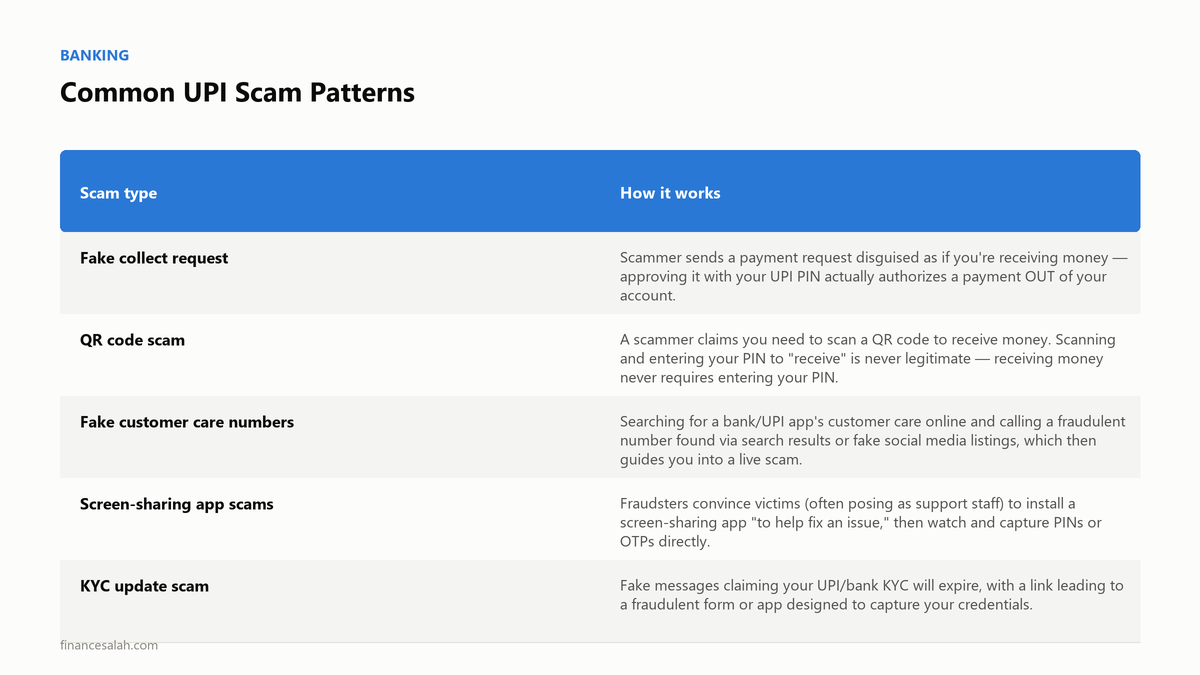
Common UPI Scam Patterns
| Scam type | How it works |
|---|---|
| Fake collect request | Scammer sends a payment request disguised as if you’re receiving money — approving it with your UPI PIN actually authorizes a payment OUT of your account. |
| QR code scam | A scammer claims you need to scan a QR code to receive money. Scanning and entering your PIN to “receive” is never legitimate — receiving money never requires entering your PIN. |
| Fake customer care numbers | Searching for a bank/UPI app’s customer care online and calling a fraudulent number found via search results or fake social media listings, which then guides you into a live scam. |
| Screen-sharing app scams | Fraudsters convince victims (often posing as support staff) to install a screen-sharing app “to help fix an issue,” then watch and capture PINs or OTPs directly. |
| KYC update scam | Fake messages claiming your UPI/bank KYC will expire, with a link leading to a fraudulent form or app designed to capture your credentials. |
| Job/refund scams | A fraudulent “advance payment” or “processing fee” request via UPI, disguised as necessary for a job offer, prize, or refund process. |
The One Rule That Prevents Most UPI Fraud
Entering your UPI PIN is only ever required to SEND money — never to receive it.
If any app, message, call, or QR code is asking you to enter your PIN to “receive” a payment, a refund, cashback, or a prize, it is a scam, without exception. This single rule, understood clearly, prevents the overwhelming majority of UPI fraud patterns described above.
A real story that shows why this rule matters
Meera, a retired schoolteacher, received a call from someone claiming to be from a delivery company, saying a package couldn’t be delivered because of a small pending customs fee. The caller sent what looked like a payment request through her UPI app and told her to “enter your PIN to receive the refund once the fee is verified.” She nearly did — the request looked legitimate on her screen, and the caller’s manner was calm and professional throughout. What stopped her was a conversation she’d had with her grandson weeks earlier, where he’d told her, plainly: “You never need your PIN to get money, Nani — only to send it.” That single sentence, remembered at the right moment, was the entire difference between a normal Tuesday and a financial loss. It’s a genuinely good illustration of why this one rule, repeated often enough to become automatic, matters more than any amount of general “be careful online” advice.
Safe Habits for Everyday UPI Use
- Never enter your UPI PIN in response to an incoming request — pause and read exactly what any prompt says before approving it.
- Verify customer care numbers only through the official app or website, never through a general web search or a number provided in an unsolicited message/call.
- Never install a screen-sharing or remote-access app at the request of someone claiming to be bank or company support — legitimate support never asks for this.
- Don’t click links in unsolicited SMS/WhatsApp messages claiming KYC expiry, account suspension, or similar urgency — go directly to your bank/UPI app instead.
- Set a reasonable per-transaction UPI limit within your app’s settings, which limits potential damage even if a single transaction is compromised.
- Enable transaction alerts so you’re notified immediately of any activity, allowing faster reporting if something unauthorized occurs.
Pros and cons of common UPI safety measures
| Measure | Pro | Con |
|---|---|---|
| Low per-transaction limit | Caps potential damage from any single compromised transaction | Requires re-authorizing separately for genuinely large, legitimate payments |
| Transaction alerts enabled | Immediate awareness of any activity, faster fraud detection | Occasional notification fatigue if you transact frequently |
| Separate UPI app/account for small daily spends | Limits exposure of your primary bank-linked account | Slightly more admin overhead managing multiple linked accounts |
None of these measures make UPI use completely risk-free, but layering a few of them together meaningfully reduces both the likelihood of falling for a scam and the potential damage if one does slip through.
What to Do If You’ve Been Scammed
- Report immediately through your bank’s app or customer care, and request a transaction block/dispute — speed genuinely matters for any chance of fund recovery.
- Call 1930, India’s national cybercrime helpline number, specifically for financial fraud, as soon as possible after discovering the fraud.
- File a complaint on the National Cyber Crime Reporting Portal (cybercrime.gov.in) with all transaction details.
- Report to NPCI through your UPI app’s grievance/dispute mechanism, which is a mandated feature across UPI-enabled apps.
- File a police complaint (FIR) if the amount is significant or if the above channels don’t lead to resolution, since a formal FIR can be necessary for certain recovery or insurance processes.
Acting within the first few hours significantly improves the chance of transaction reversal or fund freezing before the money moves further — delay meaningfully reduces recovery odds.
Common Mistakes
- Confusing a “collect request” with “receiving money” — this single confusion underlies a large share of UPI fraud victims’ experience.
- Trusting a customer care number found via a general web search rather than the official app/website, where scammers often plant fake listings.
- Installing remote access/screen-sharing apps at a caller’s request, believing they’re legitimate support.
- Delaying reporting, assuming nothing can be done, when prompt reporting genuinely improves recovery chances.
- Sharing OTPs or UPI PINs over a call or message with anyone, including someone claiming to be bank staff — legitimate bank staff never ask for this.
- Reacting to urgency without pausing to verify — scammers deliberately create time pressure (“your account will be blocked in 10 minutes”) precisely because it short-circuits careful thinking; a genuine deadline from your bank rarely requires an instant, panicked response.
- Assuming a scam only happens to “careless” or less tech-savvy people — well-informed, cautious people fall for well-executed scams too, especially ones that exploit a specific, believable pretext rather than an obviously fake one.
Myth vs Fact
| Myth | Fact |
|---|---|
| “I need to enter my PIN to receive money via UPI.” | Entering your PIN is only ever required to send/authorize a payment — receiving money never requires PIN entry, under any circumstance. |
| “Bank customer care will call and ask for my PIN or OTP to verify my account.” | Legitimate bank or UPI app support never asks for your PIN, OTP, or full card details over a call or message — any such request is a scam indicator. |
| “If a customer care number appears in Google search results, it’s official.” | Fraudulent listings are sometimes planted specifically to appear in search results — always verify contact numbers directly through the official app or website. |
| “Nothing can be done once a UPI fraud transaction is completed.” | Prompt reporting (within hours, ideally) through your bank, the 1930 helpline, and the National Cyber Crime Reporting Portal can sometimes lead to transaction reversal or fund freezing before money moves further. |
Expert Tips
- Save your bank and UPI app’s official customer care number directly in your contacts, sourced only from the official app, so you’re never tempted to search for it in a moment of urgency.
- Set a UPI transaction limit that matches your actual typical usage, rather than leaving it at the app’s maximum default.
- Treat any unexpected urgency (“your account will be blocked in 24 hours”) as a red flag by default, regardless of how official the message looks.
- Periodically review your linked UPI apps and devices in your bank’s settings, removing any old or unrecognized device access.
- Teach less digitally-experienced family members the core rule explicitly, in plain language, rather than assuming they’ll pick it up naturally — a five-minute conversation can prevent a genuinely significant loss.
- Avoid conducting UPI transactions over public or unsecured Wi-Fi where practical, sticking to your mobile data or a trusted network for financial transactions specifically.
Checklist
- [ ] Understand that PIN entry is only for sending, never receiving, money
- [ ] Save official customer care numbers directly from the app, not from search
- [ ] Never install screen-sharing apps at a caller’s request
- [ ] Set a reasonable per-transaction UPI limit
- [ ] Enable transaction alerts for immediate notification
- [ ] Save the 1930 cybercrime helpline number in your contacts
- [ ] Know the reporting steps (bank, 1930, cybercrime.gov.in, NPCI) before you need them
Frequently Asked Questions
Q: Do I need to enter my UPI PIN to receive money?
A: No — entering your UPI PIN is only ever required to send or authorize a payment. Any request asking you to enter your PIN to “receive” money, a refund, or cashback is a scam.
Q: What should I do immediately if I’ve been scammed via UPI?
A: Report immediately through your bank’s app/customer care, call the national cybercrime helpline at 1930, file a complaint on cybercrime.gov.in, and report through your UPI app’s NPCI-mandated grievance mechanism — acting quickly significantly improves recovery chances.
Q: How can I verify if a customer care number is genuine?
A: Only use contact numbers found directly within your official banking or UPI app, or the bank’s official website — never trust a number found through a general web search or an unsolicited message/call.
Q: Is it safe to scan any QR code to receive a payment?
A: No — scanning a QR code and entering your PIN is never required or legitimate for receiving money. If you’re asked to do this to “receive” funds, it’s a scam.
Q: What is the national helpline number for financial cyber fraud in India?
A: 1930 is India’s national cybercrime helpline number, specifically for reporting financial fraud, alongside the National Cyber Crime Reporting Portal at cybercrime.gov.in.
Q: Can UPI transactions ever be reversed once completed?
A: Reversal isn’t guaranteed, but prompt reporting to your bank and the cybercrime authorities can sometimes lead to a fund freeze or reversal if acted on quickly, before the fraudster moves the money onward — this is exactly why speed matters so much in the immediate aftermath.
Q: Are older adults more vulnerable to UPI scams than younger users?
A: Vulnerability isn’t strictly about age — it’s more about familiarity with common scam patterns. Older adults sometimes have less exposure to how these specific scams typically unfold, which is why sharing the core “PIN is only for sending” rule explicitly with less digitally-experienced family members is genuinely worthwhile.
Q: Should I disable UPI entirely if I’m worried about fraud?
A: Not necessary — UPI itself is a secure, regulated payment system; nearly all fraud stems from social engineering (tricking the user), not a flaw in UPI’s underlying technology. Understanding and applying the core safety rules is a far more practical response than avoiding UPI altogether.
Conclusion
Nearly every common UPI scam relies on the same core trick: getting you to approve a payment while believing you’re receiving one. Understanding that single distinction — PIN entry is only ever for sending money — prevents the overwhelming majority of UPI fraud. Combine that with a few consistent safety habits (verified customer care numbers, no screen-sharing apps, healthy skepticism toward urgency) and UPI remains genuinely safe for everyday use.
Save the 1930 helpline number in your contacts today, before you ever need it — that single step can save critical minutes if something does go wrong. FinanceSalah’s guide on fixing credit report errors is a useful next read if fraud has affected your credit profile too, and our NEFT vs RTGS vs IMPS explainer rounds out your understanding of India’s digital payment landscape beyond UPI.
Sources & Further Reading
- NPCI — National Payments Corporation of India — official UPI safety guidelines and grievance mechanisms
- Reserve Bank of India — Digital Payment Security Advisories — official fraud prevention guidance
- National Cyber Crime Reporting Portal — official fraud reporting platform
Related Reading
- Fixed Deposit vs Recurring Deposit in India: Which Is Better
- NEFT vs RTGS vs IMPS: The Difference Explained
- How to Fix Errors in Your Credit Report in India
- How to Check Your CIBIL Score for Free in India
- Secured Credit Card to Build Credit Score From Zero in India
- Best Savings Accounts in India for Young Professionals 2026
This article is for general educational purposes and does not constitute personalized security or financial advice. Scam patterns evolve over time — stay updated through official RBI, NPCI, and your bank’s current advisories, and report suspected fraud immediately through official channels.